8

I've been using my Ender 3 for about four months now and it's been working wonderfully. The print quality is amazing and all the prints are very strong. Then about three weeks ago, my entire system crashed while Ultimaker Cura was open and it lost the profile for my 3D printer. I recreated the profile to the best of my ability with other people's working profiles online, but none of them worked right. I've been getting severe under extrusion in all my prints, and they're incredibly fragile. For now, I've just been printing a 1"x1"x1" test cube. I've tried many steps from other people's posts online to fix the problem, including:

  1. Raising the print temperature for PLA to 200 °C.

  2. Checking the extruder for signs of too little tension or too much tension. I checked, and the PLA has light tooth imprints on it, and no grinding or damage to the filament.

  3. Clearing out the extruder. I disassembled the whole extruder assemble, and flushed all the plastic from each part with a heat gun, and metal pick, and then tried reprinting, but it didn't work.

  4. Trying a newer Ultimaker Cura version. At the time, I was using Ultimaker Cura 3.1 and hadn't updated because it was working well. I then tried the newest stable release of Ultimaker Cura 3.6, with a few different profiles, and then I also tried the beta version of Ultimaker Cura 4.0, but none of these worked.

  5. Increasing the extrusion rate. I incrementally increased the extrusion rate from 100 % all the way up to 130 %. The prints looked a little better and were a lot stronger, but this still didn't fix it.

  6. Trying a different slicer. I then downloaded Slic3r and created a new profile in that. The prints turned out a lot better, but there was still significant under extruding.

  7. Checking the filament tube for any burns or damage, and ensuring it's inside the extruder assembly all the way.

If anyone can help me figure out what's going on with my printer, I'd really appreciate it!

Here are some pictures of the prints I've been getting: These were made in Ultimaker Cura with different small changes to the profile made
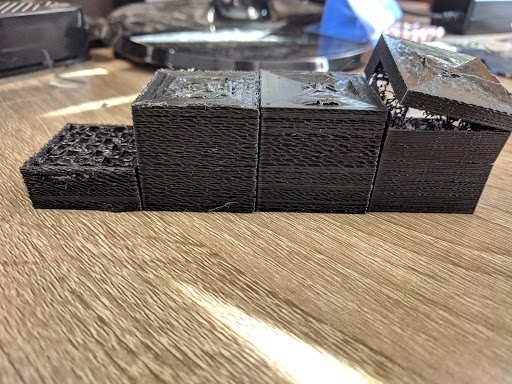
Ultimaker Cura Settings Under Extrusion

These were made in slic3r with a flow rate adjusted up to 130% Slic3r Under Extrusion
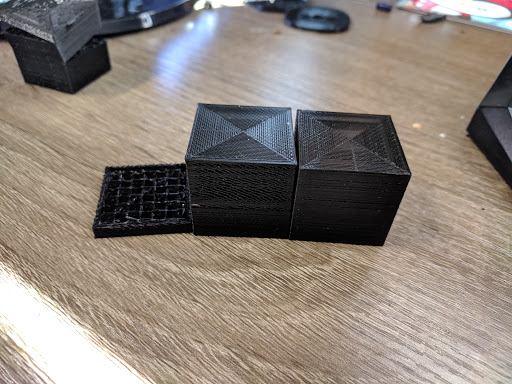
These were prints I made before I lost all my settings in Ultimaker Cura. Good Prints
Here's some of the material I read/watched and checked before posting myself:

Edit: Here's my printer profile: Ender 3 Profile Google Drive

John Deters
  • 623
  • 6
  • 9
Tinkerman255
  • 183
  • 1
  • 1
  • 6

3 Answers3

7

It is not too rare to create a new machine in Ultimaker Cura to be set to 2.85 mm as this is the default. Also some bugs in the past did reset or assume this diameter unless you manually set it, and unless we know your exact version we can't confirm it is really this.

Underextrusion why?

The 0.55 mm more radius result in an underextrusion due to the pressed through volume, and since $V=A\times l$, we need to see the area to see how severe the underextrusion is for one given extruded length. $A_{1.75}=2.405\text{ mm²}$ and $A_{2.85}=6.379\text{ mm²}$ are rather obvious, so $\frac {\text{real extrusion diameter}} {\text{calculated extrusion diameter}}=\frac{A_{1.75}}{A_{2.85}}=37.7\ \%$, so only about 40 % of the needed filament is pressed through the nozzle as the slicer thinks it is almost twice the diameter. This matches well with the 130% still being very spotty, as that'd need a much higher factor to compensate for the underextrusion. A compensating extrusion multiplier would be $\frac 1 {0.377}=265.25\ \%$.

Fixing

To fix this, check under filament and set it to 1.75 mm so you force the correct diameter. Remember that filament diameter is not saved in the printer profile but in the material database.

You might need to restart Ultimaker Cura to activate these new settings.

Trish
  • 22,760
  • 13
  • 53
  • 106
1

My Man, The Ender 3 Marlin firmware saves your E-Steps on the SD Card and you basically have to check the E-Steps every startup because the Firmware sets back the E-Steps Value every shutdown to the minimum 93. Thats a known issue of the Enders and still on the Mk.3 aka Ender 3v2 present. It's an easy fix.

tjcaul
  • 233
  • 1
  • 8
0

The following saved me from under extrusion on Ender 3 Pro.

  1. Check the diameter of the material referenced and the nozzle parameter in your slicer (Cura, ...). Then re-slice.

  2. If not sufficient, it may be a printer parameter issue. The extruder parameter is missconfigured: the stepper to filameter distance ratio is not correct and as a result, it does not feed the requested length of filament. To fix the printer parameter, send the following gcode sequence (use a G-code console like "GCode Sender - Pronterface"). We will follow this procedure:

    • ask to feed 100 mm of filament
    • mesure the actual length feeded
    • read the parameter inside the printer
    • write correct value.

G-code:

M83 ; set to extruder relative mode
; Be ready to mesure how much filament will really be consumed
G1 E100 F100 ; request 100 mm of filament
; Let "L" be the length in mm you mesured
; Now read the extruder related value in the printer
M503 ; and let "V" be the last number at line "echo: M92"
; Then set the correct value 
M92 E{V*100/L}; Eg "M92 E222"
M500 ; write to memory
Bastoon
  • 1
  • 1