2

I am having a few problems with my BLTouch. I have calibrated it several times using different methods and get the nozzle being 1.3 mm lower than the BLTouch pin so a Z offset of -1.3 mm. This works fine for auto homing, bed levelling and using code G1 Z0 to lower to where needed. However when using Cura to print the nozzle homes exactly as it should then drives the nozzle in to the bed as it starts or tries to start to print and not just a little bit either. Anyone have any ideas?

Start G-code is:

G28 ;Home
G29 ;Probe
G1 Z15.0 F6000 ;Move Platform down 15 mm
G92 E0
G1 F200 E3
G92 E0
0scar
  • 37,708
  • 12
  • 68
  • 156
MattW49
  • 21
  • 1
  • 1
  • 4

2 Answers2

2

This answer is intended to be a generic answer for Z-offset determination. The question is not clear on how the Z-offset has been determined. It appears as if this distance is measured, while in reality this cannot be measured.

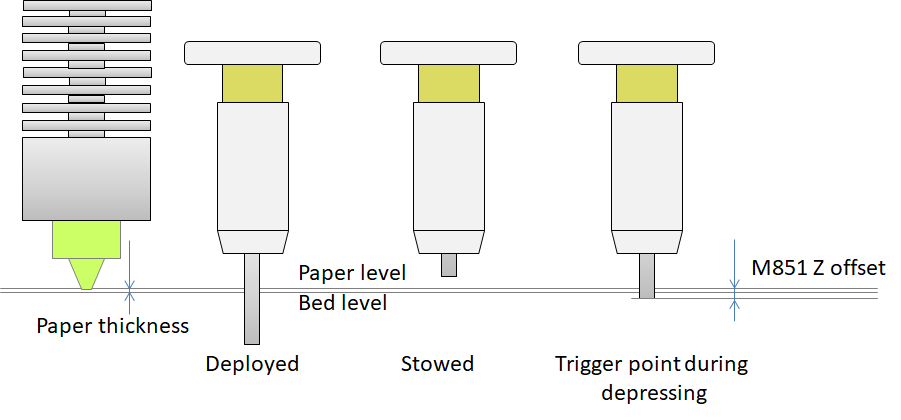
A touch (or a inductive or capacitive) probe uses a trigger point to determine the distance of the probe trigger point to the bed print surface. Correct installation is trivial, as is the determination of the nozzle to trigger point definition. For a touch sensor, the probing element is either stowed, fully deployed, or pushed in during leveling up to the point that the trigger point is reached and the probe stowes the rest of the pin, see figure:

BLTouch or 3DTouch sensor Z-offset definition

The M851 Zxx.xx offset is determined by lowering the nozzle beyond the trigger point until the nozzle hits a paper sheet. If the stowed position to nozzle distance is used, the distance is too large and the nozzle will dive into the bed on printing.

0scar
  • 37,708
  • 12
  • 68
  • 156
1

You should be able to offset this with a G54 Z-1.3 - if your setup accepts these gcodes.

If you do this, always add a G53 to the very start and just before the M30 to clear all offsets after job finish (or in the event of a cancel, at the start of the next job).

I'm not experienced with a wide variety of printers or firmware, but our repetier-based printers (and we use the same controls for our refurbished Fadal CNC machines) use G53-G59:

As explained in this tutorial from cnccookbook.com:

Basic work offsets are very simple to specify: simply enter one of G54, G55, G56, G57, G58, or G59. [...] When you execute the work offset g-code, the XYZ offset will be added to all of your coordinates from that point forward.

As detailed on Wikipedia:

G54-59: Have largely replaced position register (G50 and G92). Each tuple of axis offsets relates program zero directly to machine zero. Standard is 6 tuples (G54 to G59), with optional extensibility to 48 more via G54.1 P1 to P48.

And on the gcode dictionary provided by Hyrel 3D:

G54 through G59 - Set Offsets G54, G55, G56, G57, G58, and G59 will each store and invoke offsets in the X, Y, and/or Z axes for all subsequent moves. Any values not invoked will remain with their previous value (0 unless earlier specified otherwise).

  • X is the offset in mm in the X axis.
  • Y is the offset in mm in the Y axis.
  • Z is the offset in mm in the Z axis.

Here is an example:

G54 X100 Y-50

This command is decoded and executed by the printer as follows:

G54 (set offsets)
- X100 (+100mm to all X coordinates)
- Y-50 (-50mm to all Y coordinates)

Note that this differs from an M6, where the offsets are only applied to a SINGLE tool position.

Disclaimer: I work for Hyrel 3D.

Davo
  • 2,440
  • 1
  • 14
  • 28