Questions tagged [windows-8]

For questions specific to Windows 8. Use [windows] instead for questions involving Windows in general.

Questions with this tag should refer specifically to versions of Windows 8. Anything related in general (non-version specific) to Windows OS should be tagged with .

Windows 8 Logo

Version Relation:

An older publicly available version of Windows 8 is the Windows 8 Enterprise Evaluation, but the latest non-trial version of Windows 8 is the Windows 8 Release Preview. In addition, MSDN and TechNet subscribers have had access to Windows 8 RTM releases since August 15th.

During the //build/ conference in September 2011, Microsoft released a developer preview version of to let developers come up to speed with the new Metro UI look and design philosophy (previously seen in Windows Phone 7 & Zune HD) and its new underlying runtime: .

The main feature that was shown is the extensively redesigned user interface, optimized for touch as well as use with mice and keyboards. A new "Start screen", similar to the one in Windows Phone 7, includes live application tiles. The Start screen replaces the Start menu, is triggered by the Start button on tablets or the Windows key on keyboards, and is also the first screen shown on startup. The user can go to the regular desktop by choosing the "Desktop" tile or a traditional desktop-based application.
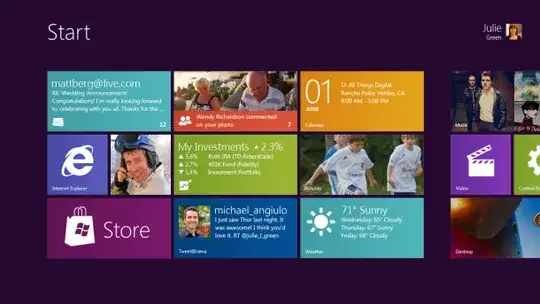
screenshot of the start screen

Windows 8 has a new developer platform called Windows Runtime, or WinRT, which is specifically used for designing new Windows 8 "Metro" apps. However, following a trademark dispute with the German company Metro AG, "Metro" apps are now officially referred to as "Modern UI" or "Windows Store" apps. This developer platform supports developing using C++/CX, managed languages C# and VB.NET, and JavaScript. Despite supporting the aforementioned managed languages, this developer platform is a COM-based API, and so it will produce native code.

The new applications run in full-screen, but two of them can be displayed side-by-side using "Snap". Examples of new applications that were demoed include a Twitter client, a weather application, a stock-tracking application, an RSS news feeder, and a virtual piano.

The new interface is primarily designed for 16:9 screen resolutions, with 1366×768 and larger screens able to display two Windows 8 applications. 1024×768 screens can display one Windows 8 application in full-screen, and 1024×600 screens can only use the traditional Windows desktop.

Windows 8 also adds support for ARM processors, in addition to continuing support for traditional x86 processors.

Significant client side technologies from Windows 8 have been incorporated into Windows Phone 8, helping to ease porting applications between these two distinct platforms.

Mike Angiulo confirmed at Computex 2011 that Windows 8 will use OEM Activation 3.0 instead of Windows 7 OEM Activation 2.1, which will make it less prone to cracks.

Helpful Links:

10543 questions
352
votes
14 answers

How can I send a Ctrl+Alt+Delete through Remote Desktop in Windows 8?

I need to send a CtrlAltDelete to a remote machine through Remote Desktop. The CtrlAltDelete is being intercepted by Windows 8, regardless of whether the remote desktop has focus or is in full screen. I'm remoting in to a Windows XP machine, and…
rtf
  • 12,826
341
votes
7 answers

How to pin either a Shortcut or a Batch file to the new Windows 7, 8 and 10 Taskbar and start menu?

We are having trouble adding our batch scripts to the Windows 7, 8 or 10 taskbar or start menu. Our batchfiles take some arguments and just execute other application based on those arguments . To keep it simple, we created some shortcuts for our…
Shaharyar
  • 3,761
290
votes
14 answers

Equivalent of Linux `touch` to create an empty file with PowerShell

Is there an equivalent of touch in PowerShell? For instance, in Linux I can create a new empty file by invoking: touch filename On Windows this is pretty awkward -- usually I just open a new instance of Notepad and save an empty file. So is there a…
jsalonen
  • 9,241
240
votes
6 answers

Troubleshoot High CPU usage by the "System" process

I have noticed that from some time my system is freezing and it's probably caused by the high CPU usage which is caused by the system process. All applications I'm running is Skype, TeamSpeak and Chrome, so it definitely shouldn't eat that amount of…
Scott
  • 2,513
230
votes
6 answers

Windows 8 Hyper-V - how to give VM internet access?

I've got Windows 8 Pro on my home machine. I want to have a Windows 7 Professional VM running under Hyper-V, and I want the VM to have full internet access. My physical machine has a wireless network adapter I use to connect to a router. Here's what…
Graham Clark
  • 2,381
223
votes
4 answers

How to delete a file with a path too long to be deleted

I was working with some computer vision source code I found and didn't realize that it creates a cache file that has a VERY LONG name and now I can't delete the 2 of them. I tried to rename it to a shorter name but I can't do anything to the file, I…
Chris
  • 2,341
199
votes
2 answers

How to stop Microsoft from gathering telemetry data from Windows 7, 8, and 8.1

Some of the update patches pushed to Windows 7, 8, and 8.1 during this year seem to be solely for the purpose of gather data from a user's system. Is there a way to disable the telemetry through some setting(s)? Or is it necessary to dig up which…
user392306
172
votes
9 answers

How to rename user folder in Windows 8?

When I log in on a Windows 8 machine for the first time with my Microsoft Account (by providing an e-mail address), a new user folder is created: C:\Users\dzinx_000 In previous versions of Windows, I could choose the name of this folder (it was…
Dzinx
  • 4,230
148
votes
13 answers

Permanently remove/disable Touch Keyboard in Windows 8 taskbar?

I have Windows 8 (final, MSDN) on my Macbook Pro Retina. Windows 8's ongoing, continuous tantrum of insisting that it's on a tablet device is causing it to always have a touch keyboard 'icon' on the taskbar. The 'icon' is actually a toolbar and I…
DeepSpace101
  • 8,957
147
votes
1 answer

Why is the total memory usage reported by Windows Task Manager much higher than the sum of all processes' memory usage?

Task Manager shows my total memory usage at 90% of my 6 GB total, but no single process is using more than 250 MB RAM, and the sum of RAM use of all running processes is less than 2 GB. I've tried: Looking at the numbers in the "Memory" column on…
Josh
  • 3,099
140
votes
4 answers

How do I get out my embedded Windows 8+ key from a Linux environment?

I have seen other SuperUser questions on this topic: How to find Windows 8 product key? | How to find Windows 8 OEM product key? However, all of the answers assume you have Windows 8 running. I've already done a clean install of Ubuntu 13.04 on my…
VerdantOzark
  • 3,343
  • 3
  • 17
  • 16
139
votes
11 answers

Disable Narrator shortcut key in Windows

I've install Windows 8 on a BootCamp macbook air The problem is that the command key located differently from the winkey in a normal keyboard, therefor, I keep clicking Winkey+Enter which starts the narrator (which is really annoying!) Is there a…
Dig
  • 1,453
137
votes
9 answers

How do I turn off Modern UI and get the old Start Menu back in Windows 8?

I just bought a new Windows 8 laptop, but I want to get rid of the new "Modern UI" Start Screen, and get the old Start Menu back. How do I do this?
MatthewSot
  • 3,667
135
votes
6 answers

Why is CBS.log file size 20 GB

Two days ago I had a full C: drive, after which I deleted 8 GB of data. The next day the hard drive was full again, so I continued with deleting another 5 GB, and once again the next day the disk was full. After some searching for what caused the…
skmasq
  • 1,461
132
votes
7 answers

Display the taskbar clock on multiple screens in Windows?

Is it possible to display the clock on the taskbar on each screen in Windows 8, preferably without 3rd-party tools?
Caleb Jares
  • 2,639
1
2 3
99 100