226

For anyone who's serious about storage performance, SSDs are always the fastest solution. However, WD still makes their 10,000 RPM VelociRaptor hard drives, and a few enthusiasts even use enterprise-grade 15,000 RPM SAS hard drives.

Aside from cost, is there still a reason to choose a 10,000 RPM (or faster) hard drive over an SSD?

Answers should reflect specific expertise, not mere opinion, and I'm not asking for a hardware recommendation.

bwDraco
  • 46,683

9 Answers9

180

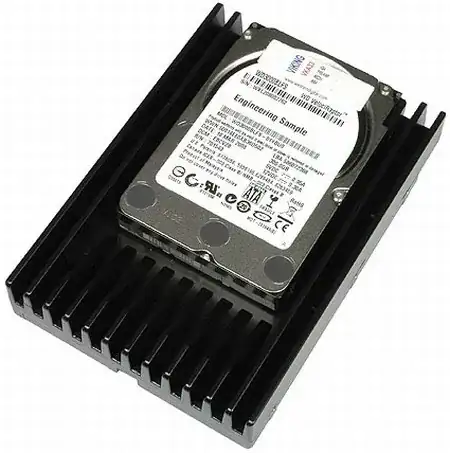
enter image description here

This is a velociraptor. As you may notice, it's a 1tb, 2.5 inch drive inside a massive heatsink meant to cool it down. In essence, it's an 'overclocked' 2.5 inch drive. You end up having the worst of all worlds. It's not as fast at random reads/writes as an SSD in many cases, it doesn't match the storage density of a 3.5 inch drive (which goes up to 3-4 tb on consumer drives, and there's 6 tb and bigger enterprise drives).

An SSD would run cooler, have better random access speeds, and probably have better performance, especially where the equivalent SSD, while costlier, is likely to be a higher end one, and SSDs generally have better speeds as they get bigger.

A normal HDD would also run cooler, have better storage density (With the same 1tb space fitting into a 2.5 inch slot easily), and cost per mb/gb would be lower. You might also have the option of running these as a raid array to make up for the performance deficiencies.

The comments also indicate that these hard drives are loud in general - SSDs have no moving parts (so, they are silent in normal operation), and my 7200 RPM drives seem quiet enough. Its something worth considering when building a system for personal use.

Taking all this into account, with a sensible planned upgrade path, and endurance tests demolishing the myth that SSDs die early, I wouldn't think so. The thinking enthusiast would use an SSD for boot, OS and software, and a regular spinning hard drive for bulk storage, rather than picking something that tries to do everything, but doesn't do it quite as well, or cheaply.

As an aside, in many cases, 10K RPM enterprise drives are getting replaced by SSDs, especially for things like databases.

Journeyman Geek
  • 133,878
74

Not sure these justify picking a hard drive over a NAND-Flash SSD, but they are certainly areas that a 10,000 rpm hard drive would offer benefits over one.

  1. Write amplification. Hard drives can directly over-write a sector, but NAND-Flash SSDs cannot overwrite a page. The entire block must be erased, and then the page can be re-used. If there is other data in the block's other pages, it must be moved to a different block, before the erase.

    A common block size is 512KiB, and a common page size is 4KiB. So if you write 4KiB of data, and that write needs to be done to a used block, that means at least 508 KiB of extra writes have to occur first; that's an inflation rate of 127x. You might be able to write 2x or 3x as fast as you can to your 10,000 rpm hard drive, but you may also end up writing 127x more data. If you are using your drive for small files, write amplification will hurt you in the long run.

    Due to the nature of flash memory's operation, data cannot be directly overwritten as it can in a hard disk drive.

    (Source: http://en.wikipedia.org/wiki/Write_amplification)

    Typical block sizes include:

    • 32 pages of 512+16 bytes each for a block size of 16 KiB
    • 64 pages of 2,048+64 bytes each for a block size of 128 KiB
    • 64 pages of 4,096+128 bytes each for a block size of 256 KiB
    • 128 pages of 4,096+128 bytes each for a block size of 512 KiB

    (Source: http://en.wikipedia.org/wiki/Flash_memory)

  2. Long-Term Storage. Magnetic storage mediums often retain data longer when un-powered, so hard drives are better for long term archiving than NAND-Flash SSDs.

    When stored offline (un-powered in shelf) in long term, the magnetic medium of HDD retains data significantly longer than flash memory used in SSDs.

    (Source: http://en.wikipedia.org/wiki/Solid-state_drive)

  3. Limited lifespan. A hard drive can be re-written to until the drive breaks from wear and tear, but a NAND-Flash SSD can only reuse its pages a certain number of times. The number varies, but let's say it's 5000 times: if you reuse that page one time per day it will take over 13 years to wear out the page. This is on par with a hard drive's lifespan but that's true only without factoring in write amplification. When the number is being halved or quartered it suddenly doesn't seem so big.

    MLC NAND flash is typically rated at about 5–10 k cycles for medium-capacity applications (Samsung K9G8G08U0M) and 1–3 k cycles for high-capacity applications

    (Source: http://en.wikipedia.org/wiki/Flash_memory)

  4. Power Failure. NAND-Flash drives don't do well with power-failures.

    Bit corruption hit three devices; three had shorn writes; eight had serializability errors; one device lost one third of its data; and one SSD bricked.

    (Source: http://www.zdnet.com/how-ssd-power-faults-scramble-your-data-7000011979/)

  5. Read Limits. You can only read data from a cell a certain number of times between erases before other cells in that block have their data damaged. To avoid this, the drive will automatically move data if the read threshold is reached. However, this contributes to write amplification. This likely won't be a problem for most home users because the read limit is very high, but for hosting websites that get high traffic it could have an impact.

    If reading continually from one cell, that cell will not fail but rather one of the surrounding cells on a subsequent read. To avoid the read disturb problem the flash controller will typically count the total number of reads to a block since the last erase

    (Source: http://en.wikipedia.org/wiki/Flash_memory)

Oliver Salzburg
  • 89,072
  • 65
  • 269
  • 311
Robin Hood
  • 3,501
23

Tons of bad answers here from people that obviously only know low end SSD.

There is one reason - Price. Mostly if you do not need the performance. Once you need the IOPS budget a SSD (even in a Raid 5) gives you - anything else does not matter.

10K SAS/SATA drive: around 350 IOPS. SSD: The ones I use - last years model, enterprise - 35000

Go figure - either I need the speed, or I do not. If I do not, large discs beat everything. Cheap, good. If I need the speed, SSD's rule (and yes, SAS has advantages, but seriously guys, you can get enterprise SATA discs as easily as "look up the part number and call a distributor").

Now endurance. Those SSD I use are "mid quality". 960GB Samsun 843T's reconfigured toi 750GB the Samsung warranty covers 5 full writes per day over 5 years. That is 3500GB written every day. Before warranty runs out. Higher end models are good for 15 - 25 complete writes per day.

We move our in house virtualization platform from Velociraptor (yes, you can get them in a real 2.5" configuration if you are smart enough to look up a part number and call a distributor) with a Raid 50 of SSD and while the cost was "significantly higher" the performance went from 60MB/sec to 650. I have zero latency increase under normal load even during backups. Endurance? Again, my warranty is quite clear on that ;)

TomTom
  • 1,277
20

Aside from cost, is there still a reason to choose a 10K RPM (or faster) hard drive over an SSD?

Isn't it obvious? Capacity. SSDs simply can't compete on capacity. If you care that much more about performance than capacity and want a single disk solution, an SSD is for you. If you prefer more capacity, you can go with a raid array of HDDs to get plenty of capacity and make up a good portion of the performance gap.

psusi
  • 8,122
19

Speaking as a Storage Engineer, we've been deploying flash across the environment. The reasons we aren't doing so faster are:

  • cost. It remains eye wateringly expensive (especially for 'enterprise grade') - may not look like much on a 'per server' basis, but adds up to shockingly large numbers when you're talking multiple petabytes.

  • density. It's related to cost - data centre space costs money and you need additional RAID controllers and supporting infrastructure. SSDs are only just starting to catch up with the larger size spinning platters. (And there's a price differential there too).

If you could ignore cost entirely, then we'd be all SSD. (Or 'EFD' as some vendors prefer to rebadge them, to differentiate 'enterprise' from 'consumer').

One of the biggest problems most 'enterprises' have is that pretty fundamentally - terabytes are cheap, but IOPs are expensive. SSDs give a good price-per-IOP, which makes them attractive - providing your storage provisioning model includes some thought as to IO requirements.

Sobrique
  • 446
6

Enterprise SAS disks have their place in the enterprise. You buy them for reliability and speed. Some SAS drives also support the SATA interface while others are only SAS. The main difference is the difference is occurrence of the URE or Unrecoverable read Error. Normal consumer drives are usually 1 in 10 ^ -14. Enterprise SATA and SAS+SATA drives are 10 ^ -15 while pure SAS drives, the real enterprise drives are 10 ^ -16. So there certainly is a place for enterprise disks in the world. They are just really expensive.

SSD are vulnerable to the same URE error but it's not that easy to know when or how it will happen since the makers don't tell you the rate of occurrence on many devices. Though some ssd controller makers say they have stellar numbers like Sandforce [1]. There are also enterprise sas based ssd's which have a ure of 10 ^ -17 or -18.

Right now for the money I don't think there's any reason to go for a raptor drive. I think the main selling point of the product was the lower cost for larger storage space and higher seeking speed. But now as 1TB ssd's are getting cheaper and cheaper these products will likely not be around much longer. I can only find it under the workstation section of the western digital site. 1TB of storage for $240 is much cheaper than a 1TB SSD. There's your answer.

[1] http://www.zdnet.com/blog/storage/how-ssds-can-hose-your-data/1423

Biff
  • 195
4

I see no reason not to use SAS SSDs over SAS HDD. However, if presented with the choice between a SAS HDD and a SATA SSD, my enterprise choice might well be the SAS drive.

Reason: SAS has better error recovery. A non-RAID edition SATA HDD might hang the whole bus (and with that possibly deny usage of the whole server) when it dies. A SAS-based system would just lose one disk. If that is a disk in a RAID array then there is nothing stopping the server from being used until end of business, followed by a drive replacement.

Note that this point is moot is you use SAS SSD's.


[Edit] tried to put this in a comment but I have no markup there.

I never said that the SAS controller will connect to another drive. But it will handle failure more gracefully and the other drives on the same backplane will remain reachable.

Example with SAS:

SAS HBA ----- [Backplane]
              |  |  |  |
              D1 D2 D3 D4

If one drive fails, it will get dropped by the HBA or the RAID card.

The other 3 drives are fine.
Assuming the drives are in a RAID array, the data will still be there and will remain accessible.


Now with SATA:

SATA  ----- [port multiplier]
              |  |  |  |
              D1 D2 D3 D4

One drive fails.
The communication between the SATA port on the motherboard and the other three drives will likely lock up. This can happen because either the SATA controller hangs or the port multiplier has no way to recover.

Although we still have 3 working drives, we have no communication with them. No communication means no access to the data.

Powering down and pulling a broken drive is not hard, but I prefer to do that outside business hours. SAS makes it more likely that I can do that.

Hennes
  • 65,804
  • 7
  • 115
  • 169
0

I'm missing some relevant criteria in the question:

(Leaving out archival storage (usually tapes) which don't need to be 'online' (which doesn't necessarily refer to being available via the internet))

  • Archival storage which must be available (without manual intervention loading physical medium)
  • Storage intended to be available at maximum possible speed (running your OS, Database, webserver-front-end-cache, Audio-recording/processing 'buffer', etc).

Consider the scenario of a webserver (as example):
Best speed for commonly requested data would be all in memory (like a cache). But going towards several hundreds of GB that becomes costly (and physically large) to do in memory-banks.

Between the spinning HD and MemoryBanks is an interesting option: SSD. It should be considered as a consumable (not really longterm reliable storage, mainly because of the high drop-out rates and warranty will give you a new consumable, not your data back). Especially since it's going to be hit with a lot of reads and writes (say a DAW, etc).

Now every X-amount of time you are going to backup your consumable to your storage (that's not facing front-end work-load). And every reboot (or failed consumable) you pump the archived data to your front-end consumable.

Now how fast (performance) do you need to have (disk-wise) on your storage before you hit the first other bottleneck (like for example, network-throughput) when communicating with your cache..??
If the answer to that question is low: then select low-rpm enterprise class disks. If on the other hand the answer is high: select high-rpm enterprise class disks.

In other words: are you really trying to store something (hoping you'll never need the backup tape), use common HD's. If you want to serve data (stored elsewhere) or accept data or interact with large data (like DB), then SSD is a good option.

GitaarLAB
  • 125
-1

Not mentioned in other answers, but the cost of a desktop SSD vs an enterprise HDD today is approximately the same. Long gone are the times when SSDs were considerably more expensive. Consider this 300GB HDD (2.5in):

Which works out to C$ 125.17 / 300GB = C$ 0.42 / GB.

Now consider a 256GB SSD (there are no 300GB available for SSDs):

Which is C$ 115.98 / 256GB = C$ 0.45 / GB.

As you can see the difference is not significant enough to favour a mechanical hard drive, unless you are really doing a lot of writes. Modern SSDs are capable of handling ~70GB of writes per day, and the standard warranty is 3 years. This is usually enough for most applications.

If you worry about reliability of SSDs in general, you can compare MTBF (to see it's actually the same or better than mechanical hard drives, 1.6M hours and 1.5M hours for the above examples). Or just make a RAID, if you don't trust any numbers.