5

Frequently I need to delete all of the user profiles on a computer except for two accounts. I would like to have a script that can perform this for me.

The script must work for Windows 7.

Company policy makes it difficult to download and use any third party utility, so downloading a tool that can accomplish the task is not an acceptable alternative.

Currently I have a vbscript that performs other related functions so if I could do it in VBscript that would be great. If there is a way to do it straight from the Windows command line, that works too I can just call that from my VB script.

I've looked online and I cannot find a way to do this with either VBscript or with a microsoft cmdline utility that comes installed by default on Windows 7.

Does anyone know how I could perform this?

4 Answers4

5

I would like to provide a little bit more up-to-date solution for others who might be looking to solve this in Windows 10

Seeing how Microsoft prefers CIM over WMI, and that Delete() method for win32_UserProfile object is hidden, one might think that method posted by @user318485 might be dropped or deprecated.

More up-to-date method of programmatically deleting user profile is with PowerShell

Get-CimInstance -ClassName win32_UserProfile | Where-Object {$_.LocalPath -like "*username*"} | Remove-CimInstance
Vodalus
  • 51
3

You can use WMIC.

wmic /node:localhost path win32_UserProfile where LocalPath="c:\\users\\user" Delete 2>>c:\windows\temp\wmic.err

Just replace localhost with the computer name and replace the "user" and the end of the local path with the domain username. It will not remove the domain profile, just the local profile data. It will attempt to remove the whole profile folder after removing the account but sometimes it will be left behind, usually empty.

1

You can use the net command for this.

For del user account.

net user YourUsername /del

For Add.

net user YourUserName YourPassword /add

For more info, read How to Use the Net User Command.


There is a command-line tool to do this, call Delprof2(inofficial successor to Microsoft’s Delprof).

Usage: delprof2 [/l] [/u] [/q] [/p] [/r] [/c:[\\]<computername>] [/d:<days> [/ntuserini]] [/ed:<pattern>] [/id:<pattern>] [/i]

   /l   List only, do not delete (what-if mode)
   /u   Unattended (no confirmation)
   /q   Quiet (no output and no confirmation)
   /p   Prompt for confirmation before deleting each profile
   /r   Delete local caches of roaming profiles only, not local profiles
   /c   Delete on remote computer instead of local machine
   /d   Delete only profiles not used in x days
   /ntuserini
        When determining profile age for /d, use the file NTUSER.INI
        instead of NTUSER.DAT for age calculation
   /ed  Exclude profile directories whose name matches this pattern
        Wildcard characters * and ? can be used in the pattern
        May be used more than once and can be combined with /id
   /id  Include only profile directories whose name matches this pattern
        Wildcard characters * and ? can be used in the pattern
        May be used more than once and can be combined with /ed
   /i   Ignore errors, continue deleting

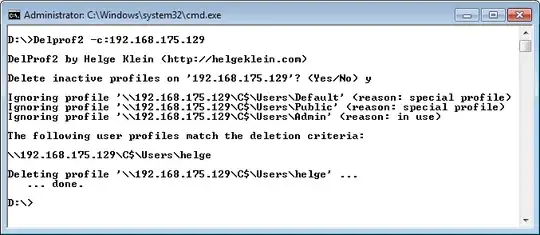
Example of Delprof2 in action, deleting user profiles remotely.

delprof2.exe -c:192.168.175.129 -p 

enter image description here

stderr
  • 10,569
  • 2
  • 36
  • 50
0

Win 7 built in Local Computer Policy -> Computer Configuration -> Administrative Templates -> System -> User Profile enable delete profiles after a certain time 60 days 30 days etc.

Will
  • 1