I would like to copy cells from Excel and paste them into Notepad using the comma , as delimiter, instead of the tab character.
Is there any way to change the delimiter without doing a find-and-replace in Notepad or saving the spreadsheet as CSV?
I would like to copy cells from Excel and paste them into Notepad using the comma , as delimiter, instead of the tab character.
Is there any way to change the delimiter without doing a find-and-replace in Notepad or saving the spreadsheet as CSV?


I don't think there's any way of changing the default delimiter character (i.e. Tab) used while copying text to the clipboard from Excel. What you can do however is create a macro to achieve the result you want.
Create a macro named something like CopySelectedCells and optionally assign a keyboard shortcut so you can invoke it quickly (I assigned it Ctrl+Shift+C for example):
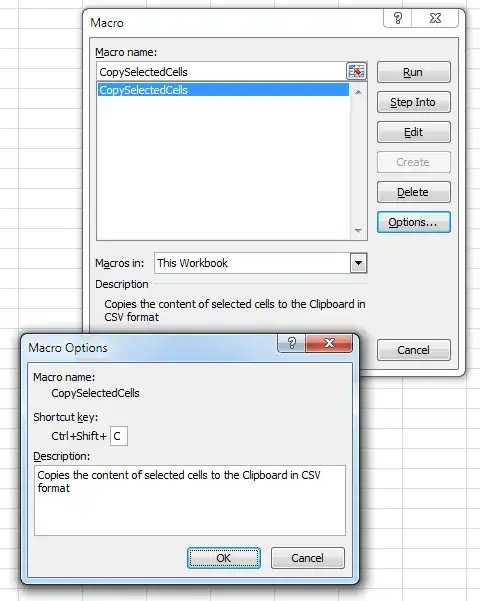
From the main Macro dialog shown above, click the Edit button to open the VBA Editor.
Go to Tools menu / References and click on the Browse button.
Add Windows\System32\FM20.dll:

Select the Microsoft Forms 2.0 Object Library option now added to the Available References list:

Edit the macro code to look like the following:
Sub CopySelectedCells()
    Dim str As String
    For Each rangeRow In Selection.Rows
        For Each rangeCol In rangeRow.Cells
            str = str & rangeCol.Value & ","
        Next
        str = Left(str, Len(str) - 1) & vbCrLf
    Next

    With New DataObject
        .SetText str
        .PutInClipboard
    End With
End Sub
Close the VBA Editor, select a range of cells and invoke the macro, then paste in Notepad to see the comma-separated result.

Contatenate required cells as string in a not used cell with comma between them and copy only this new cell and paste in notepad. For example: =A1&","&B1

You could replace all tabs with commas in Notepad++. Select all text, press Ctrl+H and use \t for tab. Be sure to turn "Extended" search mode on.


