I'm not sure if this is possible, but I want to type in foo, hit enter, and be directed to bar.com.
Asked
Active
Viewed 9.6k times
107

hookedonwinter
- 1,237
5 Answers
143
You can achieve that by taking advantage of the Custom search engines feature in Google Chrome to create simple URL shortcuts. Even though it should be used to create shortcuts for custom search engines, you can use it to create shortcuts to any URL.
Right-click the address bar in Google Chrome and click
Edit search
engines...
(or typechrome://settings/searchEnginesin the address bar).In the
Other search enginestable, scroll down, and click theAdd a new search engineempty box.- In the
Add a new search enginebox, type the name of the shortcut (i.ebar). - In the
Keywordbox, type the shortcut keyword (i.efoo). - In the
URL with %s in place of querybox, type the URL of the website (i.ehttp://bar.com).
- In the
Then, if you type the keyword foo in the address bar, a suggestion named bar will pop up, and by clicking Enter, you will be redirected to http://bar.com.


3
We were somewhat inspired by this post and built something like this in eesel
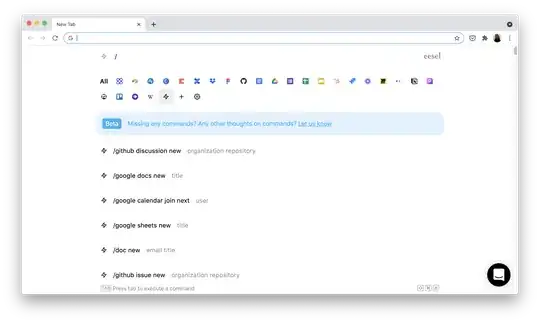
You can make "Commands" for any app which are like a shortcut to a URL. Think /github issue new <labels> <title> or /github pull request new and so on.
We took things a step further and let you configure and inject JavaScript on the page that's opened, so you can build more advanced workflows. Think /google calendar join next which goes to your calendar, clicks on your current event and joins it.
We covered it in a quick video here.


3
Solution
I created a chrome extension for doing exactly this.
It allows you to define a URL shortcut and when you search for that shortcut it will navigate to the website you have saved.
Download the extension here.
Here is a nick name I created using the example you gave.
"foo" -> "https://www.bar.com/"

PS
Incase you want to make any improvements to this chrome extension the source code is here.
https://github.com/jakemcnicholl7/web-aliases
Feel free to make a pull request and I can update the app:)


2
You can use Requestly chrome+firefox extension to setup URL shortcuts.
Follow these steps:
- Install Requestly.
- Create a new Redirect Rule.
Define Source & Destination as
Request Url -> Contains -> https://www.google.com/search?q=foo&
Destination -> https://bar.com
Here is a screenshot setting up the rule:

You can also use Regex to redirect only on certain type of value that matches the regex. This answer written by founder of Requestly explains how you can use regex to redirect based on Regex Matches.

Worthwelle
- 4,816

Sahil Gupta
- 121
1
I found the gui solution to be inadequate,too many steps. It defeats the original purpose, which is to have a shortcut...I used a windows batch script and then created a shortcut on my desktop to the batch file...Probably you can do the same using linux batch, though the location of the executable will be different. If you add the path of the chrome executable to your system variables you won't need the first two lines.
C:&
cd Program Files (x86)\Google\Chrome\Application&
chrome "http://yoururl/"
Its useful if your development environment requires you to use chrome but you prefer to do all your research in Firefox

IjonTichy
- 11