I am using a Logitech Trackman on X Windows. The Trackman has the following default button mapping:
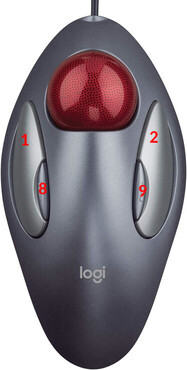
What I want to happen is for both buttons 8 and 9 to enable scrolling. That is, if I hold down either button 8 or 9 and move the ball up and down, the page should scroll as though I'd used a mouse scroll wheel.
This almost works:
Section "InputClass"
  Identifier "Logitech USB Trackball"
  MatchProduct "Logitech USB Trackball"
  Driver "libinput"
  Option "ButtonMapping" "1 2 3 4 5 6 7 9 9"
  Option "Scrollmethod" "button"
  Option "ScrollButton" "9"
EndSection
If I validate ButtonMapping with xev, it shows that clicking either of the small buttons registers as 9.
However, ScrollButton doesn't pick that up. It still only scrolls when I hold down the right-hand button, i.e. the original 9. It does not scroll when I hold down the left-hand button, i.e. the original 9 I've remapped to 8.
Is there a way to achieve what I want, or is this simply impossible with libinput?
2024-08-09 - updating with xinput result
Device 'Logitech USB Trackball':
    Device Enabled (193):   1
    Coordinate Transformation Matrix (195): 1.000000, 0.000000, 0.000000, 0.000000, 1.000000, 0.000000, 0.000000, 0.000000, 1.000000
    libinput Natural Scrolling Enabled (328):   0
    libinput Natural Scrolling Enabled Default (329):   0
    libinput Scroll Methods Available (330):    0, 0, 1
    libinput Scroll Method Enabled (331):   0, 0, 1
    libinput Scroll Method Enabled Default (332):   0, 0, 1
    libinput Button Scrolling Button (333): 9
    libinput Button Scrolling Button Default (334): 8
    libinput Button Scrolling Button Lock Enabled (335):    0
    libinput Button Scrolling Button Lock Enabled Default (336):    0
    libinput Rotation Angle (337):  0.000000
    libinput Rotation Angle Default (338):  0.000000
    libinput Accel Speed (339): 0.000000
    libinput Accel Speed Default (340): 0.000000
    libinput Accel Profiles Available (341):    1, 1
    libinput Accel Profile Enabled (342):   1, 0
    libinput Accel Profile Enabled Default (343):   1, 0
    libinput Left Handed Enabled (344): 0
    libinput Left Handed Enabled Default (345): 0
    libinput Send Events Modes Available (313): 1, 0
    libinput Send Events Mode Enabled (314):    0, 0
    libinput Send Events Mode Enabled Default (315):    0, 0
    Device Node (316):  "/dev/input/event5"
    Device Product ID (317):    1133, 50184
    libinput Drag Lock Buttons (346):   <no items>
    libinput Horizontal Scroll Enabled (347):   1
    libinput Scrolling Pixel Distance (348):    15
    libinput Scrolling Pixel Distance Default (349):    15
    libinput High Resolution Wheel Scroll Enabled (350):    1
2024-09-26 - updating with xinput a second time
$ xinput --set-button-map 9 1 2 3 4 5 6 7 9 9
$ xinput --list-props 9
Device 'Logitech USB Trackball':
        Device Enabled (193):   1
        Coordinate Transformation Matrix (195): 1.000000, 0.000000, 0.000000, 0.000000, 1.000000, 0.000000, 0.000000, 0.000000, 1.000000
        libinput Natural Scrolling Enabled (328):       0
        libinput Natural Scrolling Enabled Default (329):       0
        libinput Scroll Methods Available (330):        0, 0, 1
        libinput Scroll Method Enabled (331):   0, 0, 1
        libinput Scroll Method Enabled Default (332):   0, 0, 1
        libinput Button Scrolling Button (333): 9
        libinput Button Scrolling Button Default (334): 8
        libinput Button Scrolling Button Lock Enabled (335):    0
        libinput Button Scrolling Button Lock Enabled Default (336):    0
        libinput Rotation Angle (337):  0.000000
        libinput Rotation Angle Default (338):  0.000000
        libinput Accel Speed (339):     0.000000
        libinput Accel Speed Default (340):     0.000000
        libinput Accel Profiles Available (341):        1, 1
        libinput Accel Profile Enabled (342):   1, 0
        libinput Accel Profile Enabled Default (343):   1, 0
        libinput Left Handed Enabled (344):     0
        libinput Left Handed Enabled Default (345):     0
        libinput Send Events Modes Available (313):     1, 0
        libinput Send Events Mode Enabled (314):        0, 0
        libinput Send Events Mode Enabled Default (315):        0, 0
        Device Node (316):      "/dev/input/event3"
        Device Product ID (317):        1133, 50184
        libinput Drag Lock Buttons (346):       <no items>
        libinput Horizontal Scroll Enabled (347):       1
        libinput Scrolling Pixel Distance (348):        15
        libinput Scrolling Pixel Distance Default (349):        15
        libinput High Resolution Wheel Scroll Enabled (350):    1
versions
I've been able to reproduce this on two systems:
- Linux Mint 21.3
- X.Org X Server 1.21.1.4
.. and ...
- FreeBSD 14.1-RELEASE-p4
- X.Org X Server 1.21.1.13
