This particular feature is not provided by Cmd – it's actually provided by Conhost, the program that draws the 'legacy' console window (and is still involved behind the scenes even if you're using Windows Terminal, although it's known as OpenConsole.exe in that situation). Conhost provides line-editing, history, and alias ("doskey") features for all programs that take line-based input (aka "cooked mode" in Unix terms).
There is a fixed number of history buffers that each Conhost instance will keep per console window (as well as a fixed limit of remembered commands per history buffer):
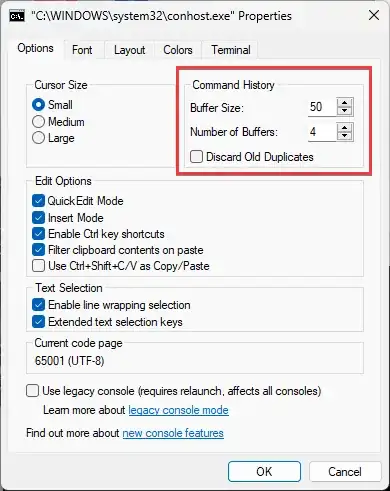
The above dialog can be accessed by running conhost cmd to have the 'legacy' console pop up, then opening its window menu and selecting 'Defaults' (not 'Properties') to adjust these limits for all console windows.
The "Windows Console" subsystem was introduced in NT 3.x around ~1995, so the limits were probably reasonable then (especially given that the history buffers used to be part of csrss.exe at the time) and nobody has tweaked them since.
The source code of Conhost is available on GitHub as part of Windows Terminal and you can find these defaults in settings.cpp. (Microsoft in general is moving away from the NT-style 'console' architecture towards the Unix-style 'terminal' model, but Conhost still exists to provide the now-legacy 'console' APIs.)
You could try proposing the default Conhost limits to be increased, but they'll probably suggest configuring them locally instead – or moving to PowerShell (which doesn't use Conhost's history; it takes input in 'raw' mode and implements its own line-editing just like e.g. Bash would).


