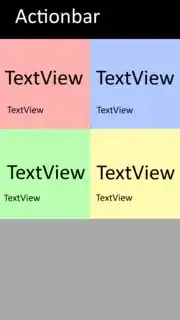
Depending on what you're doing, you could simply get 4 RelativeLayouts in.
For example :
<GridLayout
    android:layout_width="match_parent"
    android:layout_height="match_parent"
    android:layout_gravity="center_horizontal">

    <RelativeLayout
        android:layout_width="188dp"
        android:layout_height="186dp"
        android:layout_row="0"
        android:layout_column="0">

        <TextView
            android:layout_width="wrap_content"
            android:layout_height="wrap_content"
            android:textAppearance="?android:attr/textAppearanceLarge"
            android:text="Large Text"
            android:id="@+id/textView"
            android:layout_alignParentTop="true"
            android:layout_centerHorizontal="true"
            android:layout_marginTop="23dp" />

        <TextView
            android:layout_width="wrap_content"
            android:layout_height="wrap_content"
            android:textAppearance="?android:attr/textAppearanceSmall"
            android:text="Small Text"
            android:id="@+id/textView2"
            android:layout_centerVertical="true"
            android:layout_centerHorizontal="true" />
    </RelativeLayout>

    <RelativeLayout
        android:layout_width="188dp"
        android:layout_height="186dp"
        android:layout_row="0"
        android:layout_column="1" >

        <TextView
            android:layout_width="wrap_content"
            android:layout_height="wrap_content"
            android:textAppearance="?android:attr/textAppearanceLarge"
            android:text="Large Text"
            android:id="@+id/textView3"
            android:layout_alignParentTop="true"
            android:layout_centerHorizontal="true"
            android:layout_marginTop="23dp" />

        <TextView
            android:layout_width="wrap_content"
            android:layout_height="wrap_content"
            android:textAppearance="?android:attr/textAppearanceSmall"
            android:text="Small Text"
            android:id="@+id/textView4"
            android:layout_centerVertical="true"
            android:layout_centerHorizontal="true" />
    </RelativeLayout>

    <RelativeLayout
        android:layout_width="188dp"
        android:layout_height="186dp"
        android:layout_row="1"
        android:layout_column="0" >

        <TextView
            android:layout_width="wrap_content"
            android:layout_height="wrap_content"
            android:textAppearance="?android:attr/textAppearanceLarge"
            android:text="Large Text"
            android:id="@+id/textView5"
            android:layout_alignParentTop="true"
            android:layout_centerHorizontal="true"
            android:layout_marginTop="23dp" />

        <TextView
            android:layout_width="wrap_content"
            android:layout_height="wrap_content"
            android:textAppearance="?android:attr/textAppearanceSmall"
            android:text="Small Text"
            android:id="@+id/textView6"
            android:layout_centerVertical="true"
            android:layout_centerHorizontal="true" />
    </RelativeLayout>

    <RelativeLayout
        android:layout_width="188dp"
        android:layout_height="186dp"
        android:layout_row="1"
        android:layout_column="1" >

        <TextView
            android:layout_width="wrap_content"
            android:layout_height="wrap_content"
            android:textAppearance="?android:attr/textAppearanceLarge"
            android:text="Large Text"
            android:id="@+id/textView7"
            android:layout_alignParentTop="true"
            android:layout_centerHorizontal="true"
            android:layout_marginTop="23dp" />

        <TextView
            android:layout_width="wrap_content"
            android:layout_height="wrap_content"
            android:textAppearance="?android:attr/textAppearanceSmall"
            android:text="Small Text"
            android:id="@+id/textView8"
            android:layout_centerVertical="true"
            android:layout_centerHorizontal="true" />
    </RelativeLayout>

</GridLayout>
It would fit your example, but only for one screen size. If you want to have this design dynamically, you'll need to use a function, like this one :
public void fillview(android.support.v7.widget.GridLayout gl)
{
    Button buttontemp;

//Stretch buttons
int idealChildWidth = (int) ((gl.getWidth()-20*gl.getColumnCount())/gl.getColumnCount());
for( int i=0; i< gl.getChildCount();i++)
{
    buttontemp = (Button) gl.getChildAt(i);
    buttontemp.setWidth(idealChildWidth);
}
}
Click here for more informations on the subject. :)
However, if you want to use something else than GridLayout, LinearLayouts work very well for your purpose:
 <?xml version="1.0" encoding="utf-8"?>
<LinearLayout xmlns:android="http://schemas.android.com/apk/res/android"
    android:orientation="vertical" android:layout_width="match_parent"
    android:layout_height="match_parent"
    android:weightSum="1">

<LinearLayout
    android:orientation="horizontal"
    android:layout_width="match_parent"
    android:layout_height="wrap_content"
    android:layout_weight="0.33">

    <RelativeLayout
        android:layout_width="match_parent"
        android:layout_height="match_parent">

        <TextView
            android:layout_width="wrap_content"
            android:layout_height="wrap_content"
            android:textAppearance="?android:attr/textAppearanceLarge"
            android:text="Large Text"
            android:id="@+id/textView"
            android:layout_alignParentTop="true"
            android:layout_alignParentLeft="true"
            android:layout_alignParentStart="true"
            android:layout_marginLeft="38dp"
            android:layout_marginStart="38dp"
            android:layout_marginTop="31dp" />

        <TextView
            android:layout_width="wrap_content"
            android:layout_height="wrap_content"
            android:textAppearance="?android:attr/textAppearanceSmall"
            android:text="Small Text"
            android:id="@+id/textView2"
            android:layout_centerVertical="true"
            android:layout_alignRight="@+id/textView"
            android:layout_alignEnd="@+id/textView" />

        <TextView
            android:layout_width="wrap_content"
            android:layout_height="wrap_content"
            android:textAppearance="?android:attr/textAppearanceLarge"
            android:text="Large Text"
            android:id="@+id/textView3"
            android:layout_alignTop="@+id/textView"
            android:layout_alignParentRight="true"
            android:layout_alignParentEnd="true"
            android:layout_marginRight="50dp"
            android:layout_marginEnd="50dp" />

        <TextView
            android:layout_width="wrap_content"
            android:layout_height="wrap_content"
            android:textAppearance="?android:attr/textAppearanceSmall"
            android:text="Small Text"
            android:id="@+id/textView4"
            android:layout_alignTop="@+id/textView2"
            android:layout_alignRight="@+id/textView3"
            android:layout_alignEnd="@+id/textView3" />
    </RelativeLayout>
</LinearLayout>

<LinearLayout
    android:orientation="horizontal"
    android:layout_width="match_parent"
    android:layout_height="wrap_content"
    android:layout_weight="0.33">

    <RelativeLayout
        android:layout_width="match_parent"
        android:layout_height="match_parent" >

        <TextView
            android:layout_width="wrap_content"
            android:layout_height="wrap_content"
            android:textAppearance="?android:attr/textAppearanceLarge"
            android:text="Large Text"
            android:id="@+id/textView5"
            android:layout_alignParentTop="true"
            android:layout_alignParentLeft="true"
            android:layout_alignParentStart="true"
            android:layout_marginLeft="38dp"
            android:layout_marginStart="38dp"
            android:layout_marginTop="31dp" />

        <TextView
            android:layout_width="wrap_content"
            android:layout_height="wrap_content"
            android:textAppearance="?android:attr/textAppearanceSmall"
            android:text="Small Text"
            android:id="@+id/textView6"
            android:layout_centerVertical="true"
            android:layout_alignRight="@+id/textView5"
            android:layout_alignEnd="@+id/textView5" />

        <TextView
            android:layout_width="wrap_content"
            android:layout_height="wrap_content"
            android:textAppearance="?android:attr/textAppearanceLarge"
            android:text="Large Text"
            android:id="@+id/textView7"
            android:layout_alignTop="@+id/textView5"
            android:layout_alignParentRight="true"
            android:layout_alignParentEnd="true"
            android:layout_marginRight="50dp"
            android:layout_marginEnd="50dp" />

        <TextView
            android:layout_width="wrap_content"
            android:layout_height="wrap_content"
            android:textAppearance="?android:attr/textAppearanceSmall"
            android:text="Small Text"
            android:id="@+id/textView8"
            android:layout_alignTop="@+id/textView6"
            android:layout_alignRight="@+id/textView7"
            android:layout_alignEnd="@+id/textView7" />
    </RelativeLayout>
    </LinearLayout>
    <LinearLayout
        android:orientation="horizontal"
        android:layout_width="match_parent"
        android:layout_height="wrap_content"
        android:layout_weight="0.33">
</LinearLayout>
Good luck, I hope I could help.