Thanks to Jolly Mort's comment, I can answer this question now.
Running it with monerod --log-level=1 is much more verbose in both terminal and the log file at C:\ProgramData\bitmonero\bitmonero.log
The logs explain the process a bit more in depth:
2017-Jan-02 04:24:09.636702 Migrating blockchain from DB version 0 to 1 - this may take a while:
2017-Jan-02 04:24:09.636702 updating blocks, hf_versions, outputs, txs, and spent_keys tables...
2017-Jan-02 04:24:09.636702 Total number of blocks: 1142544
2017-Jan-02 04:24:09.636702 block migration will update block_heights, block_info, and hf_versions...
2017-Jan-02 04:24:09.636702 migrating block_heights:
2017-Jan-02 04:24:09.636702   block_heights already migrated
2017-Jan-02 04:24:09.636702 migrating block info:
2017-Jan-02 04:24:09.636702   block_info already migrated
2017-Jan-02 04:24:09.636702 migrating hf_versions:
2017-Jan-02 04:24:09.636702   hf_versions already migrated
2017-Jan-02 04:24:09.636702 deleting old indices:
2017-Jan-02 04:24:09.636702   old indices already deleted
2017-Jan-02 04:24:09.636702 migrating txs and outputs:
2017-Jan-02 04:24:09.652302 [check_and_resize_for_batch] checking DB size
2017-Jan-02 04:24:09.652302 [get_estimated_batch_size] m_height: 1142544  block_start: 1142044  block_stop: 1142543
2017-Jan-02 04:24:09.823902 average block size across recent 500 blocks: 5814
2017-Jan-02 04:24:09.823902 estimated average block size for batch: 5814
2017-Jan-02 04:24:09.823902 calculated batch size: 130815000
2017-Jan-02 04:24:09.823902 increase size: 536870912
2017-Jan-02 04:24:09.823902 DB map size:     12884901888
2017-Jan-02 04:24:09.823902 Space used:      10393010176
2017-Jan-02 04:24:09.839502 Space remaining: 2491891712
2017-Jan-02 04:24:09.839502 Size threshold:  130815000
2017-Jan-02 04:24:09.855102 Percent used: 0.8066  Percent threshold: 0.8000
At the bottom of the terminal, though not in the log file, it displays 827000 / 1142544 which I am assuming is the number of blocks migrated out of the total number of blocks in my database. This is exactly what I was looking for and it means that the migration process is much faster for me than trying to sync the blockchain all over again. I can see it updating and it's currently at 830000 / 1142544.
It looks something like this:
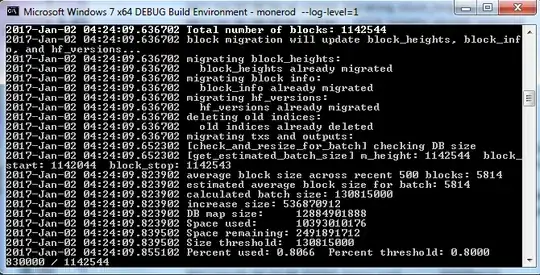
Side note: If you shut down by pressing Ctrl+c and then X out the window, it will say
2017-Jan-02 04:48:05.138644 [node] Stop signal sent
2017-Jan-02 04:56:25.103922 Got control signal 2. Exiting without saving...
Ignore this as it does appear to save and resume where it left off. I've tested and confirmed that this is the case.
Edit: This took somewhere under two days to complete (I didn't pay attention to the exact time, which could have been a day and a half) and my blockchain data was about 102 days behind the ledger after migrating. As of today, the ledger has a total of over 991 days on it. So I'm guessing this was faster in my case than synchronizing the entire blockchain. I'm on a 2.10Ghz laptop running Win64 with 4GB RAM and, perhaps most relevant, HDD (specs) not SSD.
Edit 2: It may be better to just download the blockchain again after updating because it eventually got stuck on a blockchain around 23 days behind with a bunch of errors that it just would not get past for some reason. It ended up costing me a lot more time than it was worth.


