Only shows the below - how can I run the pruning tool on mac without the utility being in the package? - I really need to get the blockchain database down in size. All posts say it should be in the MacOS folder. Thanks
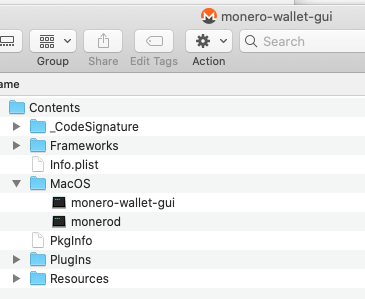
Only shows the below - how can I run the pruning tool on mac without the utility being in the package? - I really need to get the blockchain database down in size. All posts say it should be in the MacOS folder. Thanks
Ended up deleting the whole blockchain (94GB) and resynching with the --prune-blockchain start up flag for Daemon set in the miners wallet gui. This took over 5 days but I now have a 29GB blockchain a saving of 65GB!

Instead of running "monero-blockchain-prune" (which seem to have been removed), you can run "monerod" with the "--prune-blockchain" flag.
However, you will not immediately free up disk space with this option. Instead, parts of the existing database will be marked as "free". Future data will be written to the "free" portions of the database. This means the database disk space usage won't grow any further until all of those free portions have been used. Unfortunately this is not exactly equivalent to "monero-blockchain-prune".
On macOS, you'll need to use Terminal. cd to the folder that contains "monerod", then run "./monerod --prune-blockchain".
Here's what it looked like when I ran it. (It is still running, pruning the blockchain will take some time, but far less than 5 days to download it all again).
QuinnHex:~ mike$ cd /Applications/monero-wallet-gui.app/Contents/MacOS/
QuinnHex:MacOS mike$ ./monerod --prune-blockchain
2022-01-26 07:00:26.759 I Monero 'Oxygen Orion' (v0.17.2.3-release)
2022-01-26 07:00:26.760 I Initializing cryptonote protocol...
2022-01-26 07:00:26.760 I Cryptonote protocol initialized OK
2022-01-26 07:00:26.761 I Initializing core...
2022-01-26 07:00:26.762 I Loading blockchain from folder /Users/mike/.bitmonero/lmdb ...
2022-01-26 07:00:26.840 I Loading checkpoints
2022-01-26 07:00:26.841 I Pruning blockchain...

