I'm no Excel expert, as I generally use Python or R instead, but this might get you started until an Excel expert comes along. In the meantime, it would help if you clarified your question. And you should be aware that search will only find you the index of the first match, not all matches in the string. If you only need the first hit, you can use
=MID(A1,SEARCH("popul",A1,1),IFERROR(FIND(" ",A1,SEARCH("popul",A1,1)),LEN(A1)+1)-SEARCH("popul",A1,1))
although I cannot claim this is the best way to do this. You really didn't specify where you want the results to appear, how they should look, or if you only have one cell you need to search in. It would also help to know the version of Excel you have. I'll also present a crude way to return all the hits in the string:
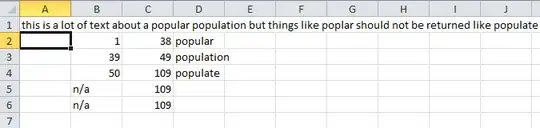
Cell A1 contains the string, B1 has no formula, and if you run out of "n/a"s you can extend columns B, C, and D by filling down. The formulas are as follows:
B3 and below use
=IF(C2+1<LEN($A$1),C2+1,"n/a")
C2 and below use
=IFERROR(FIND(" ",$A$1,SEARCH("popul",$A$1,B2)),LEN($A$1)+1)
D2 and below use
=IFERROR(MID($A$1,SEARCH("popul",$A$1,B2),C2-SEARCH("popul",$A$1,B2)),"")
As you can see, there's little to no error checking except to deal with the match at the end of the string. In the end though, if you're going to use Excel for this you should probably create a user defined function or utilize VBA instead of in-cell formulas.

