6

I am trying to print an item with a rectangular grid (using PLA on Ultimaker 2+):

item with a grid

Holes are 4x4 mm, distance between holes (wall thickness): 1mm. I am printing with 0.4 mm nozzle.

Unfortunately, Ultimaker Cura generates G-code which prints each rectangle on its own and in a quite a bad way:

print preview

The printer head tries to draw a rectangle, then moves in the direction opposite to a last laid line, which with not perfect adhesion of single line messes up the print pretty badly: it often picks up last rectangle side and drags it.

Any way to change the way Ultimaker Cura approaches to lay out the grid? I would imagine that long lines that are connected to other lines would adhere to bed much better than individual squares, but I don't see any options that would allow to alter it.

n0rd
  • 163
  • 1
  • 6

5 Answers5

6

Slicers never create a grid by crossing the already printed lines - they print perimeters and thicken them into a shell. So if the picture that is to be printed is a #, it does not lay down first the || and then the = crossing over it, it lays down an inner square and then builds the rest to get to the shape. This operation rule is held for shells, but not for infill patterns.

As you describe the printer picking up the printed, you have adhesion problems and your first layer might be not level or too thick.

You might also want to enable "print thin walls" and use 2 or 3 perimeters.

Trish
  • 22,760
  • 13
  • 53
  • 106
5

This sounds like you have an adhesion problem if it catches laid down filament, you might want to address that first. E.g. use a PVA based glue or spray to get better adhesion. This will result in not dragging laid down filament.

To my knowledge, Ultimaker Cura has no option to choose how you print the squares (direction and start point). However, you could use Z-hop so that it will lift your nozzle (or lower your build plate in your case) prior to moving to the next rectangle.

It looks as though you are using an older version of Ultimaker Cura as it only prints one line of each of the small rectangular holes (or are you actually using a single wall/shell), in later versions of Ultimaker Cura this is fixed (e.g. the image below is created with Ultimaker Cura 3.4.1), it will print all walls/shells before commencing to the next small rectangular hole. This way you have more lines deposited which have a possible better adhesion to the increase of laid down material:
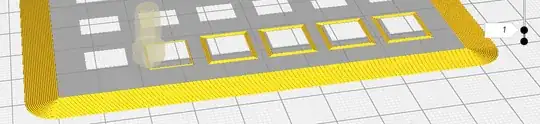
Ultimaker Cura showing all laid down perimeters of small holes in a print

Further investigation of your image shows that you are using a very fine grating (< 1 mm?) resulting in very limited amount of walls. In your case the version is not that important, but the latter information is just left as a possibility for people that use an older version of Ultimaker Cura.

Also note that there is an option to put the brim on the inside of your models (option called Brim Only on Outside), when disabled, this would also increase the surface area for better adhesion.


There are also option available to start with the outer or inner wall (option Outer Before Inner Walls), but in this case that would not help you as there is only 1 wall at each side of the rectangular hole.

0scar
  • 37,708
  • 12
  • 68
  • 156
1
  1. Use the latest stable Cura 3.6.0
  2. Ensure that the setting "Wall Line Count" > 1, recommended value is 3-4
  3. Uncheck the setting flag "Outer Before Inner Walls"
Dmitry Kasatsky
  • 221
  • 1
  • 5
1

Try slicing with 0 perimeters (so it's all infill).

Davo
  • 2,440
  • 1
  • 14
  • 28
0

Perhaps a slicer is not the ideal tool for this application. It should be possible to use the slicer to generate a 'framework' file, doing coordinate conversions, setup and such, and then write raw G-code or a script to do so.

Whether you find that a desirable approach is another question.

Technophile
  • 133
  • 9