5

Simple question: how do you reinsulate the MakerBot Smart Extruders?

Backstory: I work at the library. We've recently replaced the MakerBot (extruder connection issues followed by software incompatibility) with a Prusa.

As a new hire, I'm obsessed with the 3D printers. I'm trying to make it my mission to get the MakerBot working again, just so we can have two printers running.

It takes quite the request chain to get materials in and I had some plumbing tape on hand, so I tried to wrap it with that, per this thread. It's not going too well because of the housing around the Smart Extruder, which I cannot figure out to remove (easily and/or without voiding the warranty and taking it completely apart).

I imagine even with the cotton + Kapton tape, you'd need better access to the hotend than the housing allows.

Any help is appreciated!

Stacie
  • 51
  • 3

2 Answers2

3

I recently wrapped a LOT of hot PLA around my print head and, as a result, had to remove the kapton tape and the fibreglass insulation that came with it.

I was reluctant to use fibreglass because of the tissue embedding hazard and the lung hazard (especially on what is effectively an indoor appliance) and kapton tape is very hard to find in Australia.

After some research, I wrapped the print head in 100% wool felt that I bought from a fabric store (be very careful, as most craft felt nowadays is either acrylic, polyester or a poly/wool blend) and then bound it all up with teflon thread tape (plumber's thread tape).

Cotton has a scorch temperature of 150 to 200°C, while wool won't scorch until 500 to 600°C, and the teflon tape can handle temperatures between 200 to 300°C.

Did it work? Well I can now put my finger on the outside of the tape after the element has been at 200°C for 10 minutes, and only feel a little warmth. The print head heats up twice as fast, and I can run my massively oversized print cooling fan at 40% rather than the 10% I could use before. There is no odor of anything cooking off either. Success!

Greenonline
  • 6,748
  • 8
  • 40
  • 68
1

Strictly speaking, you do not require the insulation to be there. It is supposed to keep some of the heat contained in the core to allow more heat to be available for the filament to melt (basically higher print speeds and less chance of burning your fingers :) ).

If I go to the Makerbot website and look at the video

Smart Extruder+ - 3D Printer Extruder - 3D Printer PLA Extruder

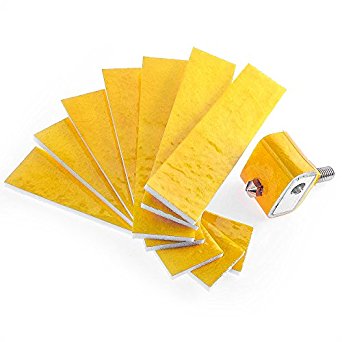
at 1:37, you'll see that the hot end is wrapped in cotton and Kapton tape. Like the stuff that is cheap and easy to buy:

enter image description here

and that the casing cover is removable, so you should be able to open it to insert new cotton. Why worry about voiding warranty? You can gain a working printer for a few bucks or bite the bullet and buy a new Makerbot Smart Extruder. I guess if you had warranty you could already have it replaced by now.

0scar
  • 37,708
  • 12
  • 68
  • 156