3

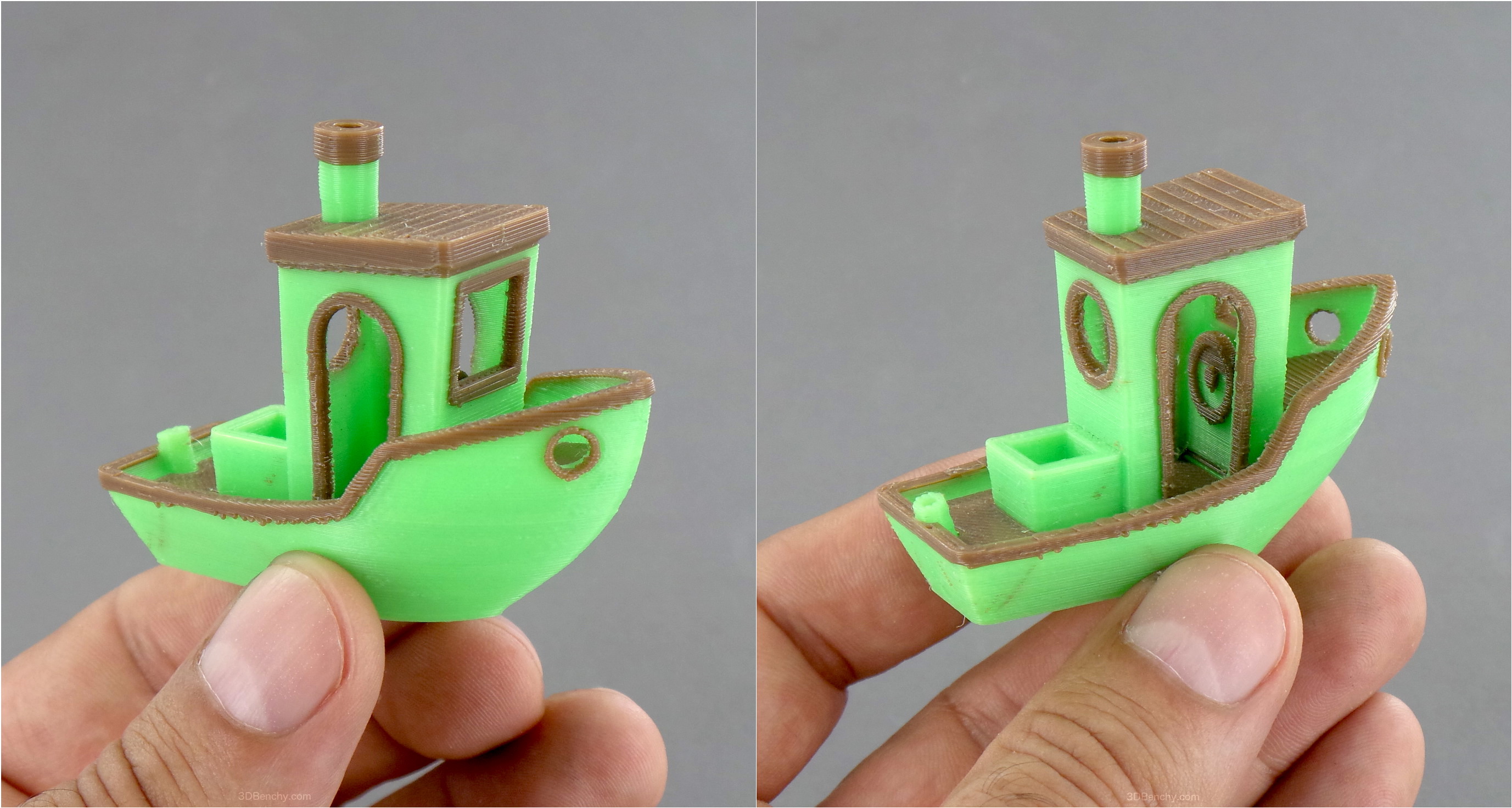
Recently got a Creator 3 (v2) and single-colour prints are great, but dual colour Benchies are coming out quite bad. Initially, I thought it was X/Y calibration as when I printed a dual-colour cube, I could feel a slight bump as I ran my fingernail across the joins. I tweaked that and the cube now seems good (pics attached), but the Benchy came out the same, with a lot of scruffy plastic in several places.

I had the same with some old Balco filament and now with Technology Outlet filament (all four reels have printed fine on their own, the prints are really good).

I'm using Flashprint 5.1 for slicing, with mostly default settings (though infill reduced to 10 % and temp increased from 200 °C to 210 °C for the Technology Outlet filament). I'm using an Ooze Shield and a brim. Stock 0.4 mm nozzles.

Any suggestions on what the issue might be or what I can do to improve it some? The dual-colour pic on the Benchy website looks way better, so I don't think it's just that these parts of the models are difficult to print.

Thanks!

Dual-colour Benchy highlighting printing errors

Another dual-colour Benchy with printing errors

A dual-colour cube showing good X/Y alignment

Another side of a dual-colour cube showing good X/Y alignment

agarza
  • 1,734
  • 2
  • 16
  • 33
Danny Tuppeny
  • 275
  • 3
  • 10

2 Answers2

2

You have a problem with retraction or more broadly with what happens to the material in the inactive extruder while it's waiting to be used again. I'm not sure what your printer does, but there are various strategies for how to handle this, which can possibly be mixed:

  • doing nothing and letting it make a mess
  • a large amount of extra retraction to get the filament entirely out of the heated zone, followed by a slow unretract into the heated zone when the extruder becomes active again
  • using a priming tower (sacrificial junk part) to re-prime the inactive nozzle when it's activated again
  • priming in thin air and using a wiping brush to clean the inactive nozzle when it's activated again
  • maybe others

You need to figure out what options are available for your printer and how to tune them to get results you're happy with.

0

I've tracked down the cause of this, although I don't yet know a solution. It only occurs with dual-colour prints and I noticed the stringing is coming from when the nozzle moves away from the print, not from the new nozzle coming towards it.

After watching some prints, I realised what it is. After finishing with a nozzle, the bed is lowered (like a z-hop), and it's thta action that is pulling filament out of the nozzle causing the string. For a standard single-nozzle print, this action does not occur, and no filament is pulled out.

The only z-hop option in Flashprint is disabled, so I'm not hopeful I can fix it here though. Perhaps other slices may do better (I'm going to try Cura next).

Danny Tuppeny
  • 275
  • 3
  • 10