6

When I print with PLA, I get a perfect first layer.

However, when I print with PETG, the first layer looks like this:

enter image description here

I've read all the info that suggests reducing the temp, speed, and increasing retraction... I've done all that which has improved things a lot, but I still get this... I can't seem to work out what's causing it.

How do I get a perfect first layer with PETG?

The latest settings that I've tried, and produced what you see in the picture are, using Cura 4.3 standard Dynamic Quality 0.16 mm profile with these tweaks:

  • Temp: 220 °C
  • Bed: 65 °C
  • Retraction Distance: 10 mm (not that this would have any bearing on this flat first layer)
  • Print Speed: 40 mm/s

One thought I had, does PETG need a different clearance between the nozzle and the bed than PLA?

0scar
  • 37,708
  • 12
  • 68
  • 156
BG100
  • 255
  • 3
  • 4
  • 9

2 Answers2

5

One thought I had, does PETG need a different clearance between the nozzle and the bed than PLA?

Short answer: "Yes, for some it does".


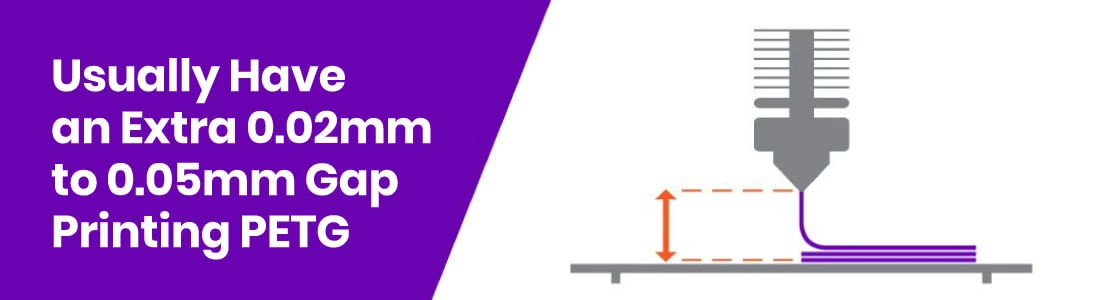
The results from your image are typically seen when the initial layer height for PETG is too small. PETG likes an additional gap on top of the usual that is used to print e.g. PLA.

For me personally I don't experience this general consensus (I've printed kilometers of PETG filament at 0.2 mm initial layer height at a glass bed with 3DLAC spray without any problems), but it is well known that if you print PETG (and if you experience problems) you need to increase the gap between the nozzle and the bed. From "PETG Filament - Overview, Step-by-Step Settings & Problems Resolved" posted on rigid.ink, you see that they (usually) advise an additional 0.02 - 0.05 mm gap:

Additional PETG gap

Bottom line, if the normal gap doesn't work for you, increase the gap to see if that works better. Note that in some slicers you can add an offset in the slicer so that you do not have to do the releveling with a thicker paper (or if you are using auto-levelling). E.g. in Ultimaker Cura you can download a plugin (for recent Cura versions from the marketplace) from user fieldOfView called "Z Offset Setting" to get the Z Offset setting in the Build Plate Adhesion section. You can also do a little trick in the G-code by redefining the height so that you can put this in a PETG start G-code or something.

0scar
  • 37,708
  • 12
  • 68
  • 156
0

When I print with PETG, my bed is 80 °C for first 2 layers then I drop it to 65 °C

Extruder temp first two layers 240-250 °C and then drop to 225-230 °C.

agarza
  • 1,734
  • 2
  • 16
  • 33